I was thinking about what security software I would consider essential when setting up a new home computer. There are a few options that come to mind, but in my opinion WinPatrol is absolutely necessary to have. When I talk with people about it I’m surprised at how few people know about it or use it. I have been using the software for the past seven years and would not feel safe using my PC without it.
WinPatrol comes in free and paid-for versions, but the free version does a great job of protecting your PC. Although WinPatrol has many really cool features, it’s primary purpose is to run in the background as you use your computer. WinPatrol keeps snapshots of important system files and will warn you if malware is trying to modify these files or set itself up as a start up program. Specifically, WinPatrol monitors modifications to the host file, prevents keylogger driver installation, rogue Active X and browser helper objects, and malicious startup programs.
Bottom line is: WinPatrol will allow you to stop many malware attacks dead in their tracks before they can even get properly started.
Another point that really sells the software for me is that the WinPatrol software is very lightweight and will not hog your system resources.
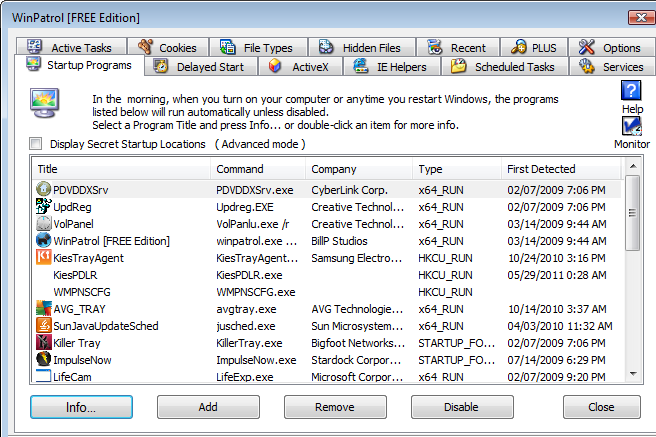
WinPatrol offers a simple no-nonsense interface (called WinPatrol Explorer) that easily lets you see and manage the important details of your computer. I really like the ability it gives you to manage your list of startup programs and speed up your system by setting a delayed start for programs that seem to take longer. Also as part of the list of tabs you can do such useful things such as:
- View ActiveX controls registered on your system
- See what IE Helper objects have found their way onto your system. These things seem to multiply on my computer since they are usually hidden and bundled with other software.
- View system scheduled tasks
- See & manage running services
- See & manage active tasks on your system
- View all of the cookies that have made their way on your system for a number of browsers (I have IE, FireFox, and Chrome on my system so it is nice to be able to clear them from a single spot)
- See hidden files registered on your system
- And quite importantly, the software lets you see a list of programs that have been installed on your computer in chronological order, which is very important when fighting malware infections.


 Justin Cooney
Leave a reply to Ralph Cancel reply