
Justin Cooney

Web Development Tips and Examples

  • A request came to my desk today about a project that is using an ASP.NET 2.0 DataGrid control to display a set of data. The DataGrid has paging enabled, but the client was complaining that the first column of the report was far too wide for the data it was displaying.

    I took a look into this and the client definitely had a point. Although the numeric values of the first column were single digit integers, the Paging information that the ASP.NET environment was appending extended the width of the first ID column to over 150 pixels which was far too wide.

    The Problem with the DataGrid Control

    When I looked into the HTML markup of the DataGrid the reason for the large first column became apparent. The DataGrid was displaying rows of data with 5 table cells per row, but the final paging row being appended to the DataGrid only had a single table cell into which the numeric paging links were being added.

    I looked this problem up online and found that many people have run into this bug throughout the past few years. But I assume that  no fix for this issue has ever been released since the DataGrid control is now deprecated.

    Below is an example of what the last two rows of markup looked like for the DataGrid, with the last (paging) row containing only one table cell.
    (more…)

  • YUI  Calendar for Multiple Text Fields
    YUI Calendar for Multiple Text Fields

    Yahoo!’s YUI JavaScript library provides many useful functions and widgets for developers to use to enhance the functionality of pages and Web forms.

    In an earlier article I explained how to add a YUI Calendar widget to a single text field on a Web form and provided sample code for this.

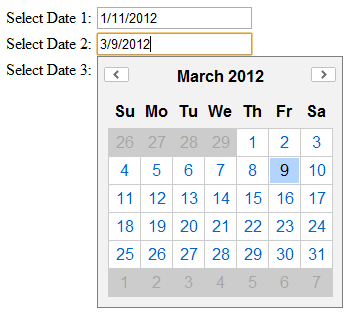
    The purpose of this article is to expand on my earlier article and show how a YUI calendar widget can be used to add date-picking functionality to multiple text fields. Below I also provide the code for a working example, as shown in the image to the left.

    Details

    For this example we have an HTML form with three text fields. The desired functionality is for a YUI Calendar widget to appear whenever one of the text fields is clicked. This calendar should show today’s date if the text field is blank, or it should show the date contained in the text field if a date existed. Once the user has finished browsing through the dates in the Calendar widget and has clicked on a date, the correct text field needs to be populated with the selected date and the Calendar widget should fade away. Alternately if the user clicks somewhere on the form surrounding the previously selected text field, then the Calendar widget must disappear.

    (more…)

  • YUI Calendar & Text field
    YUI Calendar & Text field

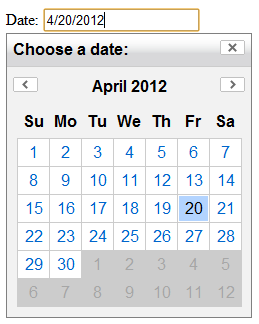
    In this article I will show a simple functioning example of using Yahoo!’s YUI API to bind a Calendar control with a single HTML text field as in the image to the left. I provide example code for this below.

    Overview

    The YUI API provides a very feature rich environment for extending the core functionality of JavaScript. Although currently JQuery exceeds YUI in popularity, YUI is constantly gaining traction among developers.

    Details

    For this example I have created a simple HTML page containing one text field. The intent is to display a YUI calendar control below the text field when the text field is clicked.

    The first step in this process is to import the correct YUI libraries. To do this, simply select the Calendar control filter in Yahoo!’s Dependency Configurator tool, and the CSS style and .JS include reference will be generated for you.

    In my case the generator created the following reference lines:

    <link rel="stylesheet" type="text/css" href="http://yui.yahooapis.com/combo?2.9.0/build/calendar/assets/skins/sam/calendar.css">
    <script type="text/javascript" src="http://yui.yahooapis.com/combo?2.9.0/build/yahoo-dom-event/yahoo-dom-
    
    event.js&2.9.0/build/calendar/calendar-min.js"></script>

    It’s as simple as that! Once this is complete you can set a styling for your page within the HTML Body tag, which I did using the following: class=”yui-skin-sam”

    Some scripting is required to register your Calendar control with your page and text field, which is done in the JavaScript tag in your page header. In the example below this is done in the line:

    YAHOO.util.Event.onDOMReady(init_calendar);

    In this code, the init_calendar function is called when the Page DOM is ready for rendering.

    Then add the init_calendar function and instantiate the Yahoo! Calendar widget and also remember to hook up the Yahoo! widget event listeners for the ‘focus’ and ‘blur’ events.

    Finally within the init_calendar function make sure to register the selectEvent.subscribe method to tell your Calendar what to do once a date has been clicked on the Calendar. In this example the selectEvent.subscribe method is hard-coded to set the selected date to the correct text field element. However this can be dynamically handled if there is more than one Date-related text element on the page.

    Example Code – How to Bind a YUI Calendar Control to an HTML Text Field

    (more…)