As a writer, blogger, or business Web site owner, it’s important to get your message out there and have people read all of the great content that you are working on. The Google Panda update that happened last year (2011) added some significant changes to the rules of the game, many of which I think are for the best.
Justin Cooney
Web Development Tips and Examples

-
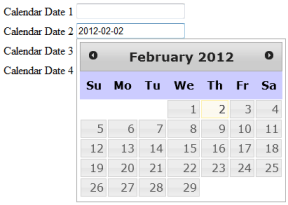
JQuery DatePicker Widget Example The JQuery DatePicker Calendar control is easy to add to your HTML page and is very configurable as far as pre-built calendar widgets go. This is important to me since I like working with dates in the yyyy-mm-dd format rather than the more confusing mm/dd/yyyy or dd/mm/yyyy formats.
One can hook up a JQuery DatePicker Calendar control to any text input field on an HTML form. The code to do so is really quite minimal, and I will cover the process in the steps below.
(more…)
-
Often while writing SQL queries I encounter situations where I want to display dates. In the past I would write applications that enforced dates to be in the mm/dd/yyyy format, but more often than not this led to confusion and mistakes for the users of an application when working with the dates.
I am not sure why the mm/dd/yyyy format is still so popular since it is easily confused with the related dd/mm/yyyy syntax, and the mm/dd/yyyy is admittedly rather illogical in terms of order. Conversely some people prefer the dd/mm/yyyy syntax for dates, but I cannot agree with this either since it can easily be confused with the mm/dd/yyyy format.
In my opinion both the mm/dd/yyyy and the dd/mm/yyyy formats end up being incredibly confusing for users of an application. If one writes an application using dates in either format one will need to add descriptive labels reminding users of the format with each date field, and even then one cannot be certain the users have worked with the dates correctly.
The Bottom Line

 Justin Cooney