
Justin Cooney

Web Development Tips and Examples

  • When starting a new Web site project in Visual Studio 2010 one has the choice between creating a Web Application Project and creating a Web Site Project. These two different project types were introduced with Visual Studio 2005 and have stayed as options with the Visual Studio line. The differences between the two project types have a fairly important impact on how the project is maintained.

    The primary difference between the two project types is that a Web Application project has a project file while a Web Site project does not. The project file acts as a file manifest so with a Web Site project one can dynamically add files outside of Visual Studio to the folder structure. This is nice for some projects and developers because individual pages can be updated without re-deploying the entire project. On the other hand, a Web Application project leans more towards code-behind and structured code releases since one needs to register any new file with Visual Studio so that it will be added to the file manifest. (more…)
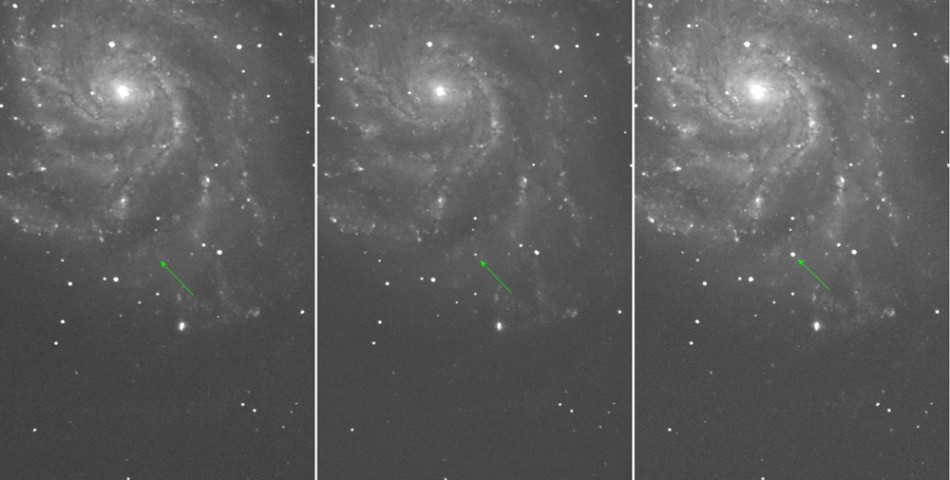
  • The PTF11kly type Ia supernova.
    The PTF11kly type Ia supernova. Credit: Peter Nugent and the Palomar Transient Factory

    64fe292167 – Today I found out about a rather unique event taking place this week. Astronomers from Berkeley have discovered a very young new Supernova relatively close to earth that they call PTF 11kly.

    The Supernova was discovered on August 24th and is estimated to be 21 million light years away from the planet Earth in the Pinwheel galaxy (Messier 101). Because of it’s close distance Astronomers are saying it could be visible with low magnification devices such as binoculars or a camera with a decent zoom. It is located in the Big Dipper constellation and it should be fairly straightforward to find at twilight in the Northern Hemisphere. (more…)

  • While rolling out a large stored procedure to our test servers today Luvy and I got a cryptic seeming server communications error message indicating there is a problem with the MSDTC settings.

    The transaction manager has disabled its support for remote/network transactions

    At first we thought this had something to do with the linked server we were using. However after testing out the various server option settings and checking for similar errors on Google it became clear that the error was due to configuration issues on the servers housing our SQL server databases.

    One of the servers is Windows 2008 and the other is Windows 2003 R2, so finding the locations of the settings was different between the two machines.

    The first set of steps was that we had to check the running services. On both machines this was the same:

    1. Click Start -> Administrative Tools -> Services
    2. In the Services popup look for the service called ‘Distributed Transaction Coordinator’ and make sure it is running

    Secondly we had to check the MSDTC options on the computer. (more…)